• About Me
  • Site Map
  • Connect
  • ✫ Resources

Michael G. Stults

Changing the world one pixel at a time

  • All Posts
  • Leadership
    • Life
      • Stress
  • How To
  • WordPress
    • Plugins
  • Social Media
  • Online Marketing
    • Affiliate Marketing
    • SEO
  • ✫ Resources
You are here: Home / Blog

How To Know What File Type To Use JPG, PNG, GIF

December 22, 2014 By Michael G. Stults Leave a Comment

jpg[Inforgraphic below] Ever wonder what file type would be perfect for your project? If you're like me then you like to have a little cheat sheet to keep a fresh reminder of which file types like JEPG, PNG, or GIF you should be using whether it is for online or offline uses. Every project is different. How to know what file type to use is something that some take for granted and may not put a lot of thought into…. as if life wasn't cumbersome enough??? ha

Who Is Hosting This provided a nice infographic that I wanted to pass along and share. All credit should go to them but I see it as a valuable resource and a good post that I feel my readers would entertain and gain knowledge from. There is always a consistent battle of what file type to use to make sure when you are compressing an image that you won't loose too much of the quality of your image.

File size is equally important for your own server and certainly keeping the overall size of your email marketing email down to appropriate levels.

When to Use JPG

Use JPG for still images, real-world images, complex coloring, shading of light and dark. Consider using a good compressing tool like JPG Mini or CompressJPG.com to reduce the file size to save space on your server.

When to Use PNG

Use PNG for things like web images such as logos that involve transparency and fading, images in the middle of editing process, and complex images like photographs if file size isn't an issue. You can still crunch and condense a PNG file just like JPG so keep that in mind.

When to Use GIF

Use GIF for web images with few colors, small icons (favicons), animations, and simple images. Nice thing here is compression won't loss quality.

Know Your File Types: When to Use JPEG, GIF, & PNG - Via Who Is Hosting This: The Blog

Source: WhoIsHostingThis.com

Filed Under: Blog, How To Tagged With: compression, GIF, How to know what file type to use, images, JPG, PNG

How to Setup MySQL Workbench Database for WordPress on Windows Server

October 9, 2014 By Michael G. Stults 5 Comments

MySQL WorkbenchSetting up a MySQL database while installing WordPress on their host has came a long ways compared to even 5 years ago. Most people experience an easy way to use cPanel, Fantastico, or Simple Scripts which provide a push button approach of installing and doing the heavy lifting for you such as your Wordpress files on your domain and creating the database. Ideally this post is for someone that is fairly new but has some experience with setting up WordPress.

Recently I came across the need to do it manually. Now, most hosting companies allow you to create an individual database manually and off to the races you are. Typically that entails a pretty control panel to make your life easier. On this current project, they were using what I refer to as a raw server. There is no easy control panel to quickly eliminate several steps to create a database for your new WordPress website. It was a Dedicated Windows Server.

This is where MySQL Workbench comes into play.

The goal I was accomplishing was to set up a WordPress blog within an existing site. That site was built on Bootstrap and was NOT currently using WordPress as it's “engine”. Essentially, a static website.

How to Get Started with MySQL Workbench For WordPress Database

If your dedicated or virtual private server does not already have MySQL Workbench installed, head on over to get it downloaded: Go HERE. This assumes it isn't already installed. I won't be going over on how to install it but the prompts are fairly straight forward to get things set up. Your default username will always be “root”. I recommend choosing a complex and strong password if you choose to leave your username the same.

Step 1: Assuming you have Workbench ready to roll…. open the program. You will come to the “home” screen where you should see something similar to this. Now, my screenshot here is showing you a couple “tiles' but that is only because I've created a few.

MySQL Workbench Home Screen

MySQL Workbench Home Screen

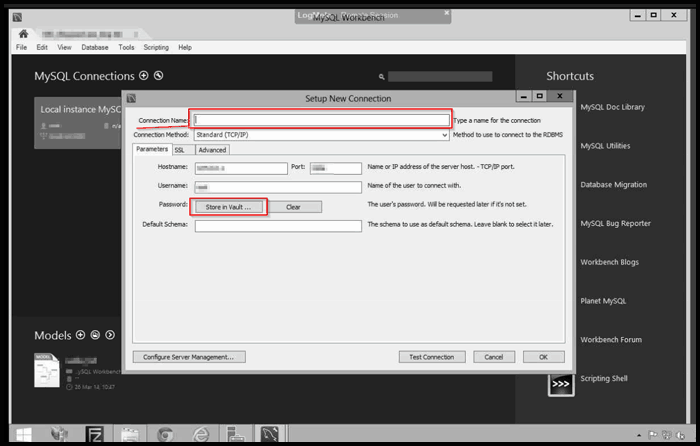
Step 2: You will want to select the “+” sign next to “MySQL Connections” at the top left hand side (main screen). Just give that ol' plus sign a click and up pops a window over your screen as shown below.

  • Name: Enter a “Connection Name”. It can be whatever your heart desires.
  • Connection Method: It defaults to “Standard (TCP/IP). I would just leave it alone. You have the option to change that though. It depends on a few other variables.
  • Hostname: Will be auto populated by default (write that down!!!!)
  • Port: Auto populated as well. (As Van Wilder said, “Write that down.”)
  • Username: If you have chosen it to be “root”… it will be sitting there for you.
  • Password: I would go ahead for good measure and click on “Store in Vault”. A new box will pop up. Enter your password and hit save. If all is well… you'll be aware.
  • Default Schema: I would say just leave blank for now because we will cover that shortly below.

Test Connection button: Click this and it will tell you if you are good. Generally you will be fine but worth doing.

Hit “OK” button to finish.

Overall, you don't really have to touch much here to move on in the process. I am sure you are relieved at this point.

Create New Connection MySQL Workbench

Create New Connection MySQL Workbench

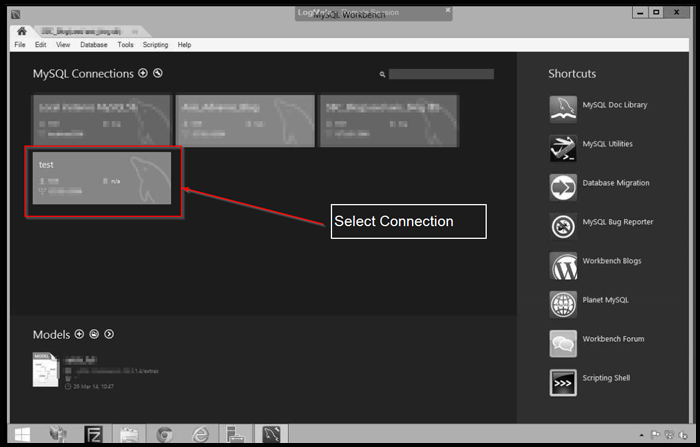
Step 3: You are back on the “Home” screen. Next you will select your Connection “Insert what you called it here” box. In my example, I called it “test”.

Select Connection MySQL Workbench

Select Your Connection from MySQL Workbench

Step 4: A new type of window has now popped up for you to look at. This area is where you could write a Query by selecting multiple databases or “Schemas” to pull data up to export, view, or correct. No worries, you won't have to mess with that during this process. 🙂

  • Lower left hand side, you will see a box menu called “SCHEMAS”.
  • You will see some existing ones that Workbench includes to give you some ideas.
  • Right below it, right click your mouse and a box will pop up.
  • Select “New Schema”.
Create New Schema

Create New Schema, right click

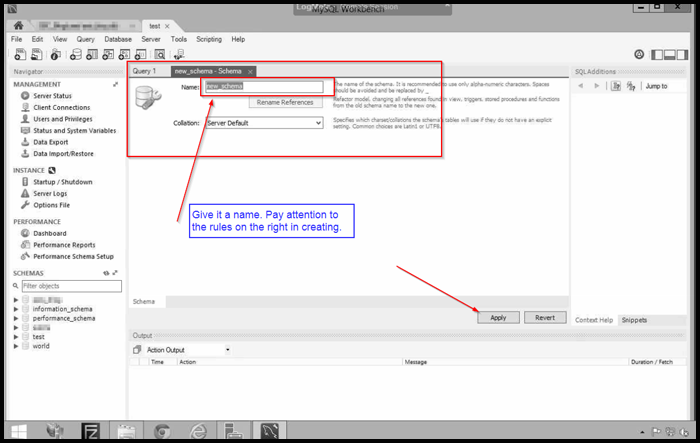
Step 5: Give your new Schema a name and hit “Apply” to move on. Make sure you pay close attention on the instructions on the right on the nomenclature. They want alpha-numeric. Spaces should be avoided and use the “_” (underscore) to separate. I would avoid calling it “wordpress” or “wp”. You could go with something like “mycoolblog_2014111”. Just mix it up some.

Remember what Van said? Yes, right this name down!

Give Schema Name

Give Your Schema (database) a Name

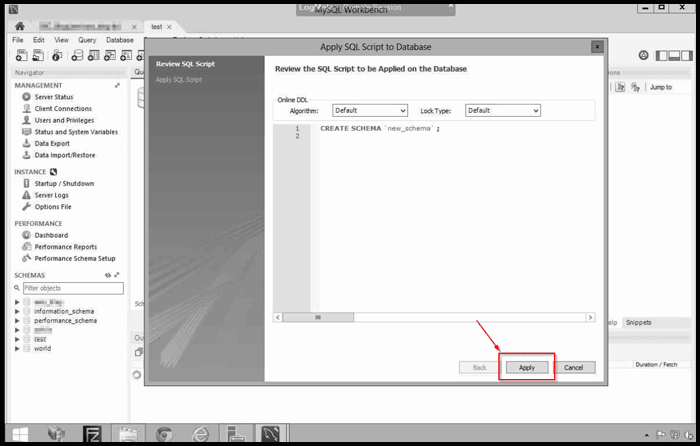
Step 6: After you hit “Apply” from the last step, you will receive another pop up box. Nothing has to be down here except hit “Apply” button again. This is creating the basic framework for the database set up. It is creating this by a “Script”.

Apply New Schema

Apply the New Schema

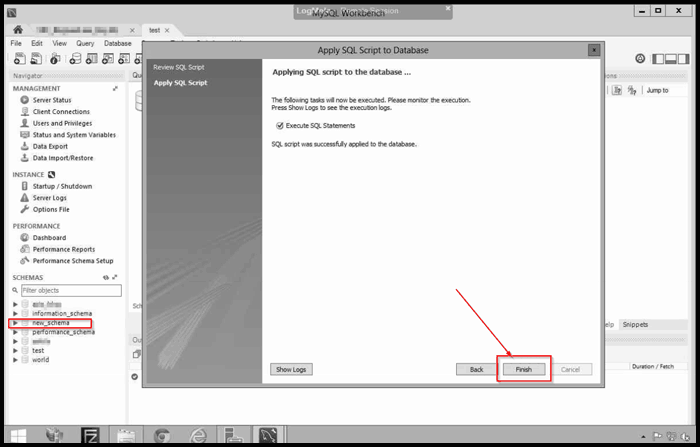
Step 7: You will see another screen after the above action and simply just hit “Finish”. The pop up will close and you are a step closer to greatness.

Finish New Schema

Press “Finish” Button for New Schema

Step 8: Looking back at the “SCHEMA” section on the lower left… I called mine “new_schema” but don't be so cool like me and use a better name like something in Step 5.

Database Created

Shows your Database was Created

Completing Manual WordPress Installation

This part is assuming you have unzipped the zip file from WordPress.com and have moved the unzipped folders and files to your folder where you want them. You have a few fields here to fill out.

  • Database Name: This was Step 5 above. Enter your name exactly.
  • Username: If you have left name as “root”, then this is what you use.
  • Password: Input your crafty mile long password you created once you installed MySQL Workbench in the beginning if you had to. Otherwise, you will know it. If not… you will have to go back and create a new user assigned to this database (SCHEMA). Creating Username & Privileges
  • Database Host: For our example here… you will need to remember what you wrote down from Step 2. WordPress will default it to “localhost” but that usually is left like that if you are on a managed server. It is an IP address along with the port. You will conjoin the two by a semicolon. It probably will look like this: 100.0.0.10:3309
  • Table Prefix: I would just leave as “wp_”.

Hit Submit button. Carry on completing the next steps for your WordPress websites. When you move on after entering your database information…. WordPress will do the heavy lifting in creating the “tables” and such needed inside of the database. That is a question a lot of people don't understand or realize. ******You may be prompted to create a “wp-config.php” file after inputting all your DB info. WordPress comes with a “sample config file” (found in root folder of installation) that you can open up and input these above credentials in if need be. After you do that, just simply rename that file to “wp-config.php” and move forward.

Manual Install WordPress Database

image credit: http://www.siteground.com/

Final Thoughts on Your WordPress Database in MySQL Workbench

I sincerely hope this has helped you in some way. The above steps helped accomplish my task. If you were like me, you probably searched through a lot of pages to find something close to accomplish this. You should experience a working WordPress blog with minimal issues. Of course, a lot of outside variables come into play but this should get you on the right track.


Michael G. Stults

Filed Under: Blog, How To, Wordpress Tagged With: Database, dedicated server, how to create database for wordpress, Installation, MySQL Workbench, windows server, Wordpress

How To Find SMTP Server Address GoDaddy For Outgoing Gmail (alternative)

June 18, 2014 By Michael G. Stults 7 Comments

This is a follow up post about how to use your domain to send and receive email using gmail. In this article I am going to share with you an alternative way to send your branded email address from Gmail when Godaddy doesn't give you an actual inbox. With domain only purchases they do not anymore give you an actual inbox (ability to send and receive using Godaddy outgoing smtp email server: smtp.secureserver.net. I will show you two alternatives to achieve sending email using your freshly created branded email address such as “[email protected]”.

Recently I've been receiving a few emails asking me on why they may not be able to send outgoing email from gmail like my original post described. It seemed that I should look into it a bit more to see if I can offer anymore value to everyone that comes by my blog. Since Godaddy stopped giving you inboxes, they are only providing you “forward” only email addresses. So that means you can create an email address like “[email protected]” and tell it to forward to “[email protected]”. So cool… you'll get the email in your inbox when someone sends to that but you will not be able to send/ reply back using that email address.

How To SMTP Server Options

Problem: Need to send email but don't want to pay Godaddy for an inbox via your Gmail account (or you don't want hosting/ cpanel with them).
Solution: SendGrid.com & Mailjet.com (both offer free accounts)

Tip: If you have cpanel / hosting with your company… you should have the ability to set up your email inbox accounts. Example in Hostgator… you set up the inbox but you also go to the “Forwarders” section and tell that email to forward a copy to your free gmail account. Following my previous posts directions, you should be golden. [Read more…]

Filed Under: Blog, How To Tagged With: cpanel, Godaddy, hosting, how to find smtp address for gmail, inbox, mailjet, send email from gmail, sendgrid, SMTP, Video

How To Add HTML Signature In Outlook 2010

March 1, 2014 By Michael G. Stults 4 Comments

Your John Hancock on Emails

Image Credit: wikimedia

So you're using Outlook 2010 these days and you need to add a nice professional HTML signature to your outgoing mail? Peaking around the internet looking for “how to add html signature to outlook 2010″…. but you're just getting tired of searching for something straight forward, easy to use.

Been stuck huh? I figured you'd be searching online and needed a good place for a quick reference (also good for me so I can point my friends and other folks there for reference).

It's quite ok… frustrating to say the least if you're on a PC. Up until now you've stuck with the basic text, inserted an image of your company logo or mugshot and you've rolled with it. Then like a kid sitting in front of a candy store, you see all the other kids walking out with their candy… AKA… attractive HTML signature!

I'll spare you the details to a degree but I mainly us Apple/ Mac but I have recently ran into a situation where I was using a client's desktop where I needed to receive mail and they were using Windows 7 on a PC. [Read more…]

Filed Under: Blog, How To, HTML Tagged With: How To Add Email Signature to outlook, HTML Email Signature, HTML Email Signature Templates, Outlook 2010, Steps

Always Finishing First

October 21, 2013 By Michael G. Stults Leave a Comment

Is finishing first always your mantra? If you think there is always an outside reward for doing so, life will sure tell you other wise. Sometimes those rewards are only self gratifying but other times you gain publicity for certain accomplishments. We all have participated in some type of sporting event or general event that classifies you as a winner, 2nd place, 3rd place and etc. My point in writing this article is to share a few things that I have learned about this statement. I feel people give up at times temporarily and need a pick up. I am no different than you. Sorry to break your heart. 🙂

Insert Brief Childhood Story Here

Finishing First Hard Work

Finishing First Hard Work

Growing up I was very timid and a shy individual. Today people would be astonished that was the case. My home life was a bit rattled with domestic violence and alcohol through what seemed every weekend. I am slightly embarrassed to now publicly say that was our childhood for a period of time. That in itself doesn't determine you as a person nor does that say your parents can not be changed progressing their life forward. Starting in 3rd or 4th grade my dad wanted me to start Boxing down at the community center. Unfortunately that was not in the plans due to some issue that night but we made our way over to a smaller group in the next building doing Kenpo Karate. For the next 4 years or so until my parents officially divorced and we moved, I cherished every Tuesday and Thursday evening.  [Read more…]

Filed Under: Blog, Leadership, Life Tagged With: Always Finishing First, discpline, dissapointment, Karate, kenpo karate, self confidence, tawkwondo, training, Video, Winning, work out, working hard

LifeSkills

August 25, 2013 By Michael G. Stults 2 Comments

We recently moved and as in normal fashion you tend to find those “hidden” boxes from your childhood or other things you meant to throw away years ago… Some of you may just throw everything out like that (childhood things) but for me, I keep a few items because it reminds me of who I am and who I was meant to be in some ways. As you get older those core principles stick with you and they are either magnified or exposed. Low and behold, I came across this “LifeSkills” document.

The LifeSkills Document

I had this document on my wall either late elementary or early middle school years. I don't exactly recall why I had this or why I kept it but I did have it hanging up in my room like a proud accomplishment. Elementary school years I was extremely shy and didn't say much of anything and continued to slowly break out of my shell as I continued to get older. It wasn't until after high school years that I realized that I had to “push” the envelope and develop into a different mindset.

Today, most people who know me on all levels would agree and certainly say that there was no way I was a very timid, shy kid growing up. Even my high school classmates would agree that there is a complete difference in my attitude of being more outgoing. One that recently stands out to me on the list is “SENSE OF HUMOR” because it was a recent conversation about an observation of me. Life is so serious; no one gets out alive. That's not to say everything is a joke because that is far from the truth. [Read more…]

Filed Under: Blog, Leadership, Life Tagged With: document of lifeskills, download list of lifeskills, LifeSkills, Our Children, Sense of humor

Don’t Listen To Negative People

August 15, 2013 By Michael G. Stults Leave a Comment

There is this story about these frogs. Naturally curious frogs…. There was a pale of milk they were playing around the edge. The two frogs fell into the pale. The other frogs came up and started laughing at them and making fun that they fell into the pale. Saying things like “you're not going to get out, ha ha ha…” laughing instead of helping them.

So both frogs start hopping, hopping trying to get out. But one frog couldn't hear that good. He was hard of hearing and the other frog could hear the other frogs. So they keep trying to get out of the pale because they knew they were going to drown. All of sudden the frog that could hear started listening to all the negative people at the top. The other frogs continued to laugh at them… ha ha ha ha and because he could hear them so dog gone well, he drowned.

The other frog couldn't hear that good so he kept on hoppin, just hoppin. He hopped so much that the milk turned into butter and it got hard and then he jumped out. When he hopped out the other frogs came up to him like “Man, listen man”. The frog says “huh”? Other frogs respond by saying “man, we were talking about you. Why didn't you drown”? Frog says “huh”? We were putting you down, talking about you. Frog responds and says “you were”? Yeah man! Frog: “Oh, I thought you were cheering me on! I didn't know. I thought I heard you say you can do it baby, come on you can make it man”.

See, that is what negative people are. You have to be a hard hearing frog because negative people are just cheering your butt on!

Be a selective listener like people who have valuable information to share. Listen to voices of value. Something of value. ~Jim Rohn

Filed Under: Blog, Leadership Tagged With: focus, Frogs, Inspiration, Jim Rohn, making butter, Negative People

17 Things Successful People Do

April 2, 2013 By Michael G. Stults 2 Comments

I came across this infograph and found it pretty darn interesting to say the least. The original article that this infograph is tied to is titled: “17 Counterintuitive Things the Most Successful People Do” by  CEO of Docstoc, Jason Nazar.

As you continue reading the information below, you'll find things that you may not agree with and then maybe some things that you will. I would say, print this off and hang it up somewhere. I feel some of these points are valid but it also takes a disciplined person to achieve a few of these items below. Depending on your demeanor and how you communicate with people, you could go in the wrong direction with the approach. As with anything, opinions are a dime a dozen. You need to find what method works best for you because when you feel one way is the only way to go about a task, someone will come along and prove  you wrong.  [Read more…]

Filed Under: Blog, Leadership Tagged With: 17 things people do, Docstoc, How to create an email signature, Infograph, Jason Nazar, Leadership, Life, Successful People

Time Management: What Have I Changed

February 27, 2013 By Michael G. Stults Leave a Comment

Time is all we have. We may find one day that you will have less than you once did. Time management all around is important. Family is also very important but to be successful most of us don't fall out of our mother's womb with a top hat and a cain while we laugh it all the way to the bank. There truly is a level of hard work dedicated to making that happen. Is it true that others have more of a “Midas Touch” than you? Sure.. I'll give you that one. I recall earlier in my working life at HSBC and there were guys that could make minimal calls but always were able to pull out big numbers for their sales that month. On the other hand… I was pounding the phone like the world was ending tomorrow but only to see not the same results. What I quickly figured out was that I had to work smarter and “cherry pick” the customers I knew we could convert. It was only when I FULLY knew the in's & outs of our products that I quickly adapted to consistently hitting higher sales. So the moral hear… you can be a copy cat… just copy the right KAT! [VIDEO Below] [Read more…]

Filed Under: Blog, Leadership Tagged With: family, Randy Pausch, task apps, task lists, Time management, to do list apps, To do lists, Video

How to Set Up A Branded Email Address Using Outlook.com

December 28, 2012 By Michael G. Stults Leave a Comment

How to set up a branded email address using Outlook.com is just as simple as setting it up in Google Apps or Gmail. Now, on the other hand, doomsday did happen to the Free Google Apps setup this December. A lot of you are asking what your alternatives may be and Outlook.com is another solution that is upcoming. Microsoft has certainly stepped up their game albeit they may be slacking in other areas at times. Coupled with email, you can also test drive Microsoft’s free SkyDrive (like Google docs) which gives you more than 7GB of storage. Google Docs only gives you 5GB of storage. Sounds good to me!

Looking for a Professional Email Address?

Outlook.com

Outlook.com

First off, [email protected] doesn’t appear to bad if you can get in early and reserve your account. Just the name “outlook” sounds good because of the branding history. Having your business name as part of your address is equally important for branding and adds that “sex appeal” to your community perspective. Smaller businesses and especially local business’s need to use every avenue to leverage the opportunity to showcase their brand in their communications.

You can set up a professional email address using your hosting companies built in solution but let’s face it… it is cumbersome and a very ugly interface with limited options. Gmail on the other hand is stellar when it comes to options. You always need more options right? Outlook.com will also get the job done on how to set up a branded email address.  [Read more…]

Filed Under: Blog, How To Tagged With: Alternatives to Google Apps, Custom domain name, Email Domain Address, Free, Gmail, Google Apps, How to set up Branded Domain Name with Outlook.com, Microsoft, MX Record, Outlook, Professional Email Address, SkyDrive, step by step guide, TXT

« Previous Page
Next Page »

About Michael Stults

Michael G. Stults

Hi, my name is Michael Stults. I appreciate you stopping by my site. I work in the online marketing industry and when time permits coupled with my two oldest sons' having (now had) a rare neurological disease called Niemann-Pick Type C, I like to write about topics that interest me. I hope at the same time that I can provide something valuable to you in return. ...Read more

Please connect with me if you would like to talk about internet marketing of any kind, non profit work, technology or business development.

FacebookInstagramTwitter

Find Your Purpose

IdeasToFortune.com

Find Me Here

Follow @MGStults Follow @MichaelStults Follow @MichaelGStults Follow @NPCFund

Top Posts & Pages

How to Setup MySQL Workbench Database for Wordpress on Windows Server
How To Find SMTP Server Address GoDaddy For Outgoing Gmail (alternative)
Connect
How To: Basics of Google Apps and Gmail
Marketing Resources

Tags In The Cloud

1and1.com Affiliate Marketing Browser Charity chrome cpanel Daily Bread facebook Free Gmail God Google Apps hosting How to How to create an email signature HTML Infograph Inspiration Jim Kukral Kansas Kansas City Leadership Life Michael G. Stults Michael Stults Mike Stults Missouri Niemann-Pick Children's Fund Niemann-Pick Type C online tool Outlook Panda Penguin plugin Plugins product SEO Small Business Social Media Struggles Thelonious twitter Video Wordpress Wordpress 3.0

Customize Your Website

WordPress Theme Editor

[footer_backtotop]

Copyright © 2025 · Designed by Michael G. Stults · Site Map